Why cold emails go to spam, and how to fix it
Most "nobody replies" problems are really "nobody saw it" problems. The four checks Gmail and Outlook run on every cold email, the six reasons yours fail, and a checklist for your next campaign.
 By
10 min read
By
10 min read
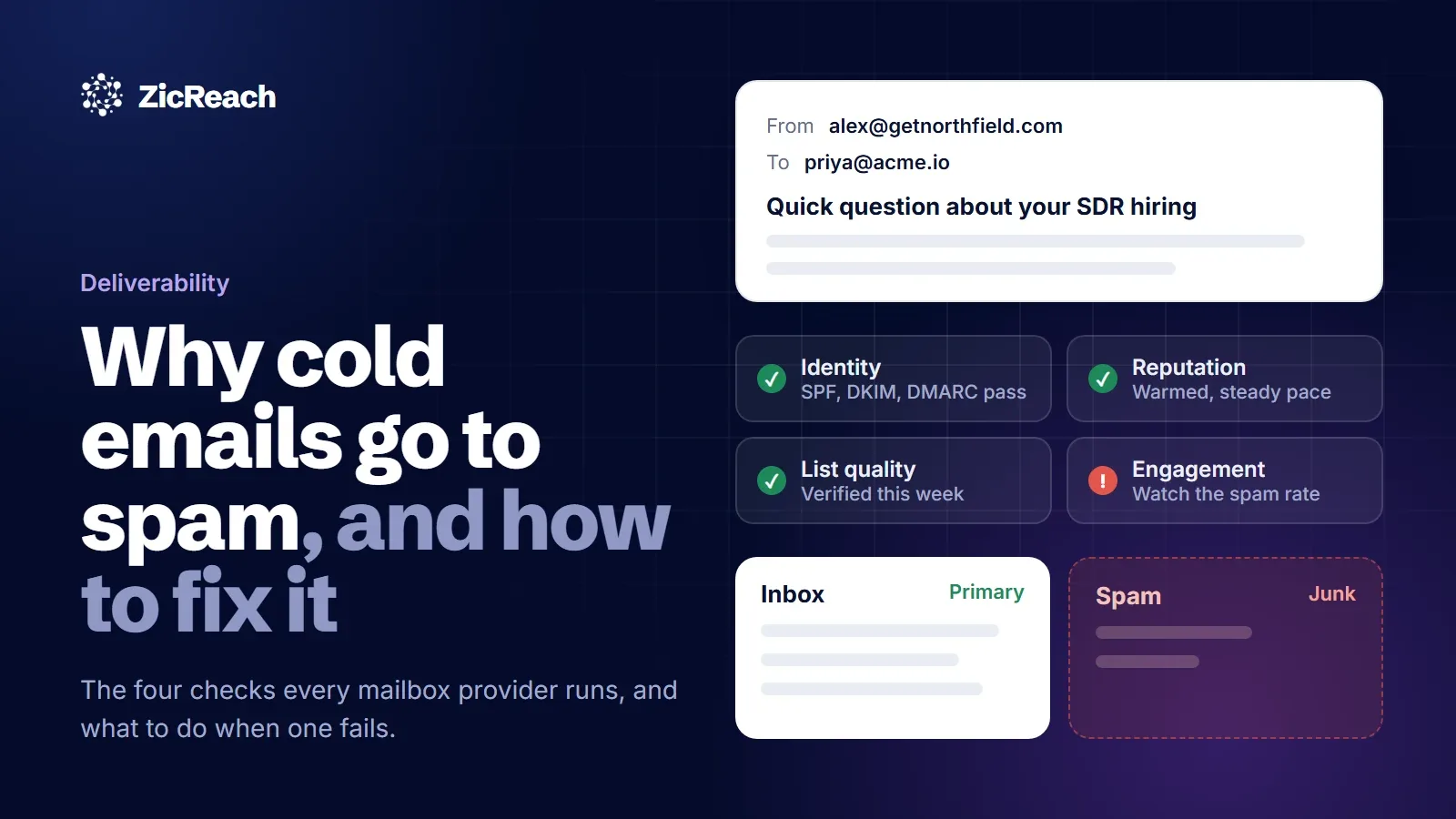
You rewrote the subject line three times. You cut the email down to four sentences. You sent it to 400 people who should care. Two replied, and one of them asked to be removed.
Before you blame the copy, check where the email actually landed. A large share of "nobody replies" problems are really "nobody saw it" problems. The message went to spam or the Promotions tab, the recipient never knew it existed, and your reply rate measured the filter, not your offer.
The good news is that spam placement is rarely a mystery. Mailbox providers like Gmail and Outlook are fairly open about what they check, and almost every cause is something you can fix in an afternoon or a few weeks. This guide walks through how the decision gets made, the six reasons cold emails go to spam, and a checklist to run before your next campaign.
How Gmail and Outlook decide between inbox and spam
Every incoming email gets a quick background check. The exact scoring is private, but the inputs are well known, and they fall into four groups:
- Identity. Can the sending domain prove the email really came from it? This is what SPF, DKIM and DMARC are for.
- Reputation. What has this domain and this mailbox done before? A long history of normal, wanted email helps. A brand new domain has no history at all, which is not neutral: it looks like what spammers use.
- List quality. Do the addresses exist? A batch with many bounces tells the provider you are mailing a bought or guessed list.
- Content and engagement. Does the message look like one person writing to another, and do people open it, reply, or mark it as spam?
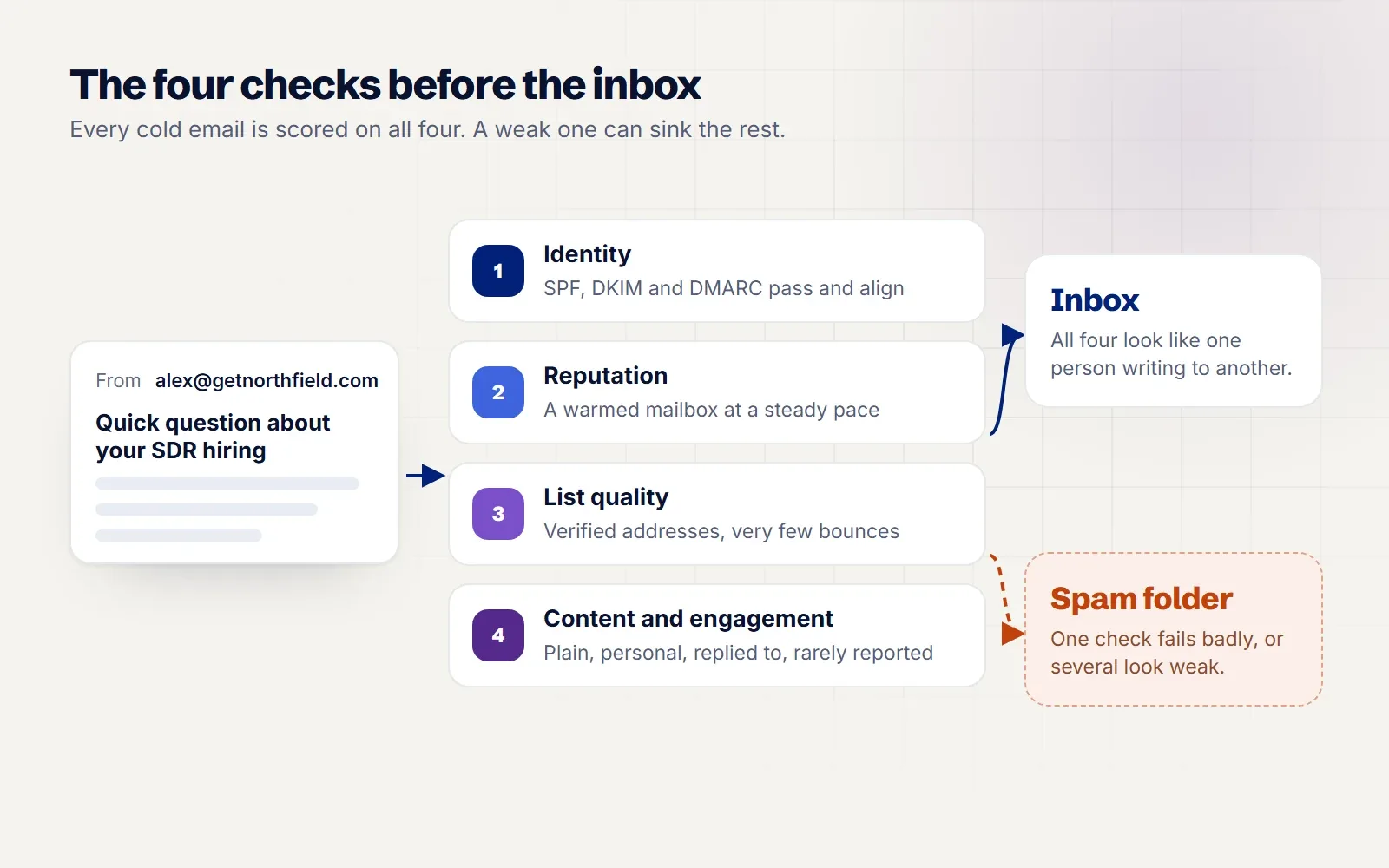
A weak score in one group can sink a message that passes the other three. That is why fixing only your copy rarely moves the needle. Work through them in order.
1. Your domain cannot prove who it is
Missing or broken authentication is the most common technical cause, and since 2024 it is no longer a soft signal. Google's email sender guidelines require every sender to Gmail accounts to set up SPF or DKIM, and anyone sending 5,000 or more messages a day to set up SPF, DKIM and DMARC, with the From domain aligned to one of them. Microsoft followed: from May 2025, Outlook.com requires SPF, DKIM and DMARC from high volume senders and routes mail that fails to Junk.
You may not send 5,000 emails a day. Set up all three anyway. The thresholds decide when you get blocked outright, not when you start losing placement.
What to set up
- SPF: a TXT record listing the services allowed to send for your domain, for example
v=spf1 include:_spf.google.com ~allfor Google Workspace. Keep one SPF record per domain; two records break both. - DKIM: a signing key your email provider gives you, published as a TXT record. Turn it on in the admin console; it is often off by default.
- DMARC: a TXT record at
_dmarc.yourdomain.com. Start withv=DMARC1; p=none; rua=mailto:dmarc@yourdomain.comso you can read reports before tightening the policy.
Then send a test to a Gmail account, open the message, choose "Show original" and confirm SPF, DKIM and DMARC all say PASS. It takes two minutes and catches most setup mistakes.
2. Your mailbox is new, or you are sending too fast
A domain registered last week that sends 300 emails on its first day looks exactly like a spammer, because that is what spammers do. Providers trust volume that grows slowly and comes with normal engagement: opens, replies, messages moved out of spam.
Warmup builds that history before your campaign starts. A warmup service sends and replies to real looking mail between your mailbox and a pool of other mailboxes, at a slowly rising volume, so your mailbox earns a track record. After that, raise your cold volume a little at a time rather than in jumps.
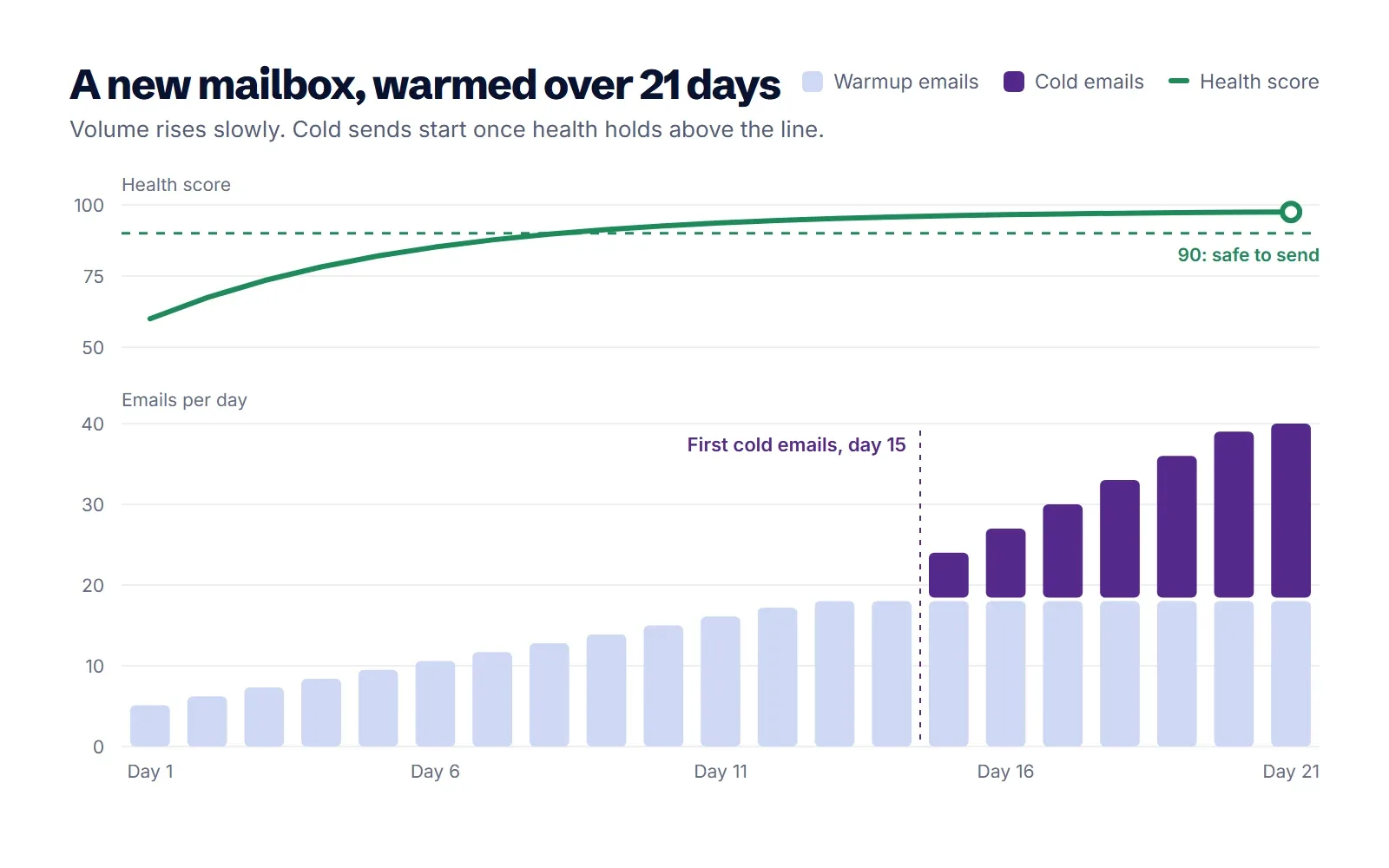
How long to warm up a new domain
Plan on two to four weeks for a new mailbox before it sends cold email at full pace, and keep warmup running afterwards. Even then, keep each mailbox modest. Around 20 cold emails a day per mailbox is a sensible start, raised by a few a day, with more mailboxes added when you need more volume. Ten mailboxes sending 30 each look far more natural than one sending 300.
Use a separate domain for cold outreach (for example getyourbrand.com next to yourbrand.com) so a bad week never touches the mail your customers and finance team rely on.
3. Your list is out of date
People change jobs all the time. The U.S. Bureau of Labor Statistics puts the median time with a current employer at 4.1 years (January 2026), which means a list that was accurate two years ago now has a meaningful share of people who have left. Their old addresses either bounce or, worse, turn into spam traps once a company recycles them.
Hard bounces are one of the clearest signals a provider gets that you are not mailing people you know. Keep them low:
- Verify every address right before a campaign, not when you first collected it.
- Drop catch-all and unknown results from your first sends, or send to them from a mailbox with a strong history.
- Set a bounce limit that pauses the campaign on its own. If a batch suddenly bounces at 5%, something is wrong with the list, and the right move is to stop and look.
4. Your email looks like a mass mailing
Spam filters do not read your email the way a person does, but they notice the same things a person notices in a newsletter blast:
- Heavy HTML, images and logos. A cold email should look like something typed in Gmail. Plain text lands in the inbox more often.
- Many links, or link shorteners. One link at most in the first email, ideally none. Shorteners are borrowed by spammers so often that they count against you.
- Open tracking pixels. Tracking adds an invisible image hosted on someone else's domain. It is optional, and for cold email it is often worth turning off.
- Hype. "Act now", all caps, piles of exclamation marks, and promises of guaranteed results. They rarely help replies either.
- Broken personalization. "Hi {first_name}" is a giveaway to both the filter and the reader. Check every merge field before you send.
Identical copy sent to thousands of people is also easy to fingerprint. Small, real variation (a line about the company, the reason you picked them) helps the reader and makes each message look like the individual email it should be.
5. People ignore you, or report you
Engagement is the part you cannot fake. If most recipients delete your email without opening it, providers learn that people do not want it. If they press "Report spam", the damage is faster and lasts longer.
Google's guidelines ask senders to keep the spam rate shown in Postmaster Tools below 0.10% and never let it reach 0.30%. That is roughly one complaint per thousand emails as the target. A list of 2,000 loosely matched contacts will hit that ceiling far sooner than a list of 200 people with a real reason to hear from you.
- Narrow your targeting. Relevance is the best spam filter there is.
- Make leaving easy. A plain line such as "Not relevant? Reply 'no' and I will not write again" costs nothing and turns would-be complaints into replies.
- Stop instantly when someone opts out, across every campaign, not just the one they replied to.
6. Nobody is watching the warning signs
Deliverability rarely collapses overnight. It slides: a few more bounces, a drop in opens, a mailbox that stops getting replies. Teams notice weeks later when the pipeline review looks thin.
Three habits catch the slide early. Give every mailbox a health score that tracks its warmup results, and pause campaigns on any mailbox that drops below your line (warmup itself should keep running so it can recover). Run an inbox placement test before each new campaign to see where your emails land at Gmail, Outlook and other providers. And check your domains' SPF, DKIM, DMARC and blocklist status on a schedule, not only when something breaks.
A deliverability checklist before your next campaign
| Check | What good looks like | How often |
|---|---|---|
| SPF, DKIM, DMARC | All three pass, From domain aligned | At setup, then monthly |
| Sending domain | Separate from your main company domain | Once |
| Warmup | Two to four weeks before cold sends, then always on | Continuous |
| Daily volume | About 20 a mailbox to start, raised slowly | Every campaign |
| List verification | Verified within days of sending, hard bounces well under 2% | Before every send |
| Email format | Plain text, one link at most, no attachments | Every email |
| Spam rate | Below 0.10% in Postmaster Tools | Weekly |
| Placement | Mostly inbox at Gmail and Outlook in a placement test | Before each new campaign |
| Opt outs | Honored at once, across all campaigns | Automatic |
Where ZicReach fits
Most of this checklist is not hard. It is just easy to forget, and it spreads across four or five tools. We built ZicReach so the checks happen where you send.
AI Warmup and deliverability warms every connected mailbox for free on every plan, gives each one a health score, and pauses campaigns on a mailbox that drops below 90 while warmup keeps going. Domain checks cover SPF, DKIM and DMARC, and inbox placement tests show where you land by provider. In AI Email Marketing, campaigns send plain text by default, start each mailbox at a modest daily pace and raise it gradually, send in each lead's working hours, and pause on their own if bounces pass 5%. Leads from the AI Leads Engine get their work emails found and verified before they ever reach a sequence.
If you want a second pair of eyes, ask ZicAgent in chat to check a campaign's mailboxes and settings. It explains what it would change and waits for your confirmation before changing anything.
Questions people ask
Is cold email legal, or is it spam by definition?
Cold email to business contacts is legal in many countries when it is relevant to the person's job, honest about who is sending it, and gives an easy way to opt out. Rules differ by country (CAN-SPAM in the US, GDPR and PECR in the UK and EU), so check the ones that apply to the people you email. What providers treat as spam is mail people do not want, which is why targeting matters as much as setup.
How long does it take to warm up a new domain?
Two to four weeks of warmup before cold sends is a good rule, with volume rising slowly after that. Keep warmup running for as long as the mailbox sends cold email, because it keeps feeding the provider good signals.
How many cold emails can I send per day from one mailbox?
Start around 20 a day per warmed mailbox and raise it by a few each day, staying well under 50 for most setups. If you need more volume, add mailboxes and domains instead of pushing one mailbox harder.
Should I send cold email from my main company domain?
It is safer not to. Use a closely related secondary domain for outreach, with its own SPF, DKIM and DMARC, and redirect its website to your main site. Your invoices, support mail and team email stay protected if outreach hits a rough patch.
Do open tracking and links hurt deliverability?
They can. Tracking pixels and tracked links add domains and images that filters weigh, and many cold emails land better without them. Measure replies instead of opens: a reply is the number you actually care about, and it cannot be faked by privacy features that preload images.
The short version
Cold emails go to spam because the provider cannot verify the sender, does not trust a new or rushed mailbox, sees bounces from a stale list, recognizes a mass mailing, or watches people ignore and report it. Fix identity first, warm up and pace your mailboxes, verify the list right before sending, write plain emails to people who have a reason to hear from you, and watch the signals every week.
Once your emails reach the inbox, the next question is turning replies into meetings. Our guide on how to get more B2B sales meetings covers the rest of the pipeline. If you would rather have warmup, health checks and campaigns in one place, start ZicReach for free and warm your first mailbox tonight. Warmup never uses credits, and the pricing page shows what everything else costs.
Put this into practice with ZicReach
Find leads, write the sequence and send from warmed inboxes in one place. Free to start, no card needed.
Start for free