How to find verified business email addresses (and keep bounces under 2%)
Finding a work email is easy; finding one that will not bounce is the hard part. Five ways to find business email addresses, how verification works, what each result means, and a checklist before you send.
 By
9 min read
By
9 min read
You found the perfect prospect. Right title, right company, the company just raised a round and is hiring. You guess the address, firstname.lastname at their domain, and send. It bounces. Worse, it does not just bounce for that one person: every bounce tells Gmail and Outlook a little more about how carefully you build your lists.
Finding a business email address is easy. Finding one that is current, correct and safe to send to is the hard part. This guide covers the main ways to find work emails, how email verification really works, what each verification result means, and how to keep your bounce rate low enough that your other emails still reach the inbox.
Why accuracy matters more than volume
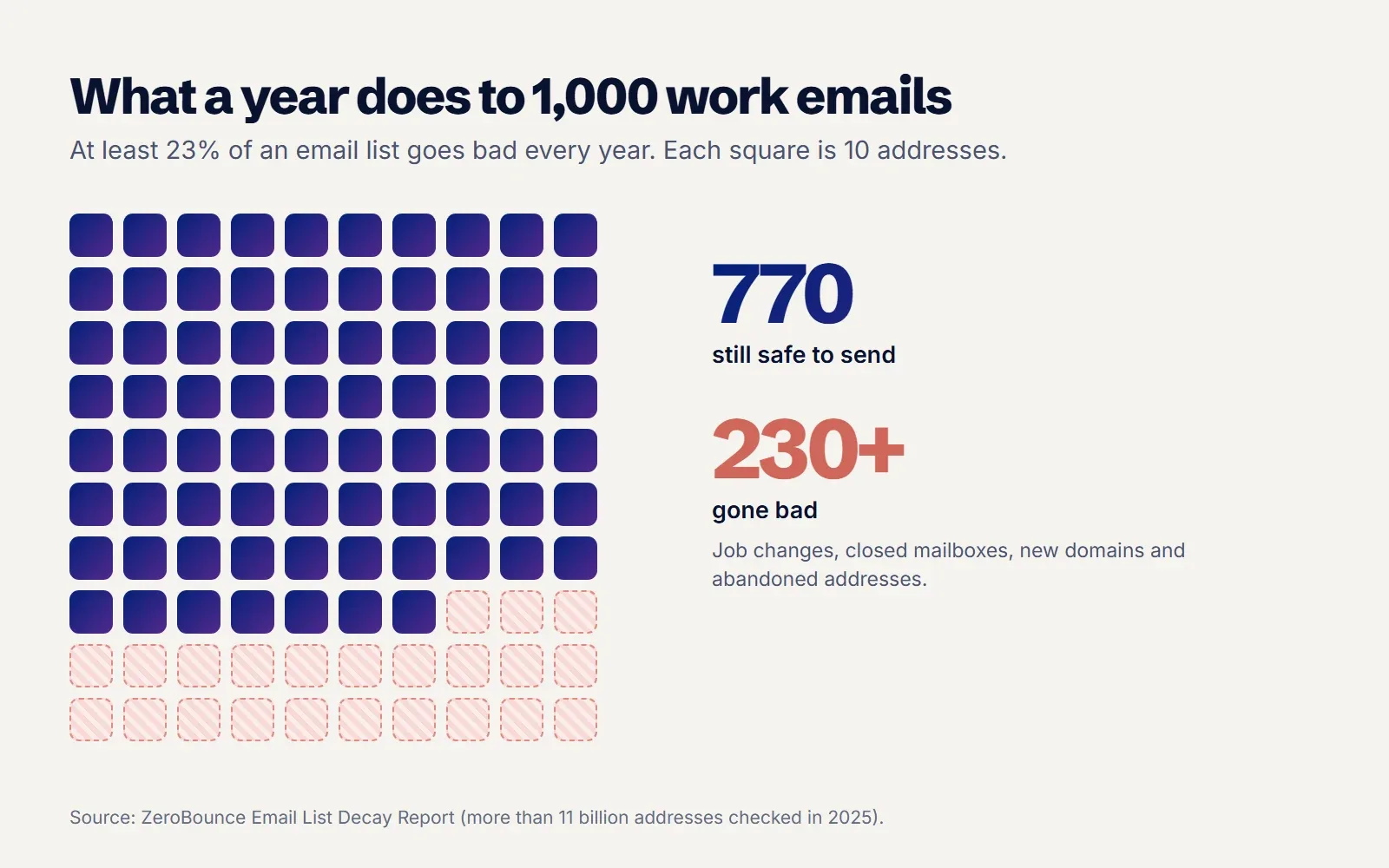
Email data goes stale faster than most teams expect. ZeroBounce's Email List Decay Report, based on more than 11 billion addresses it checked in 2025, found that at least 23% of an email list degrades every year, and that only 62% of the addresses customers submitted were valid. People change jobs, companies change domains, and old mailboxes are switched off.
Job changes alone explain a lot of it. The U.S. Bureau of Labor Statistics puts the median time with a current employer at 4.1 years. Across a list of a few thousand people, someone is leaving every week.
Each bad address costs you twice. The email is wasted, and the hard bounce is a signal to mailbox providers that you are mailing people you do not know. Mailgun describes an average bounce rate under 2% as generally acceptable and warns that even a small spike in hard bounces can trigger filtering or throttling. For cold email, treat 2% as the line you do not cross.
Five ways to find a business email address
There is no single best method. Each trades speed against accuracy and cost, and most teams end up combining two or three.
1. Look where the person published it
Company team pages, press releases, conference speaker pages, podcast show notes and author bios often include a work email. It is slow, but an address someone published themselves is usually current and you know the context. It works well for a short list of high value accounts.
2. Check their professional profiles
Some people list a work email in the contact section of their LinkedIn profile or on their personal site. Coverage is patchy, and many listed addresses are personal rather than work ones, so verify before you use them.
3. Work out the company's email pattern
Most companies use one format for everyone: firstname@, firstname.lastname@, or first initial plus surname. Find one known address at the company, apply the same pattern to your prospect and you have a likely candidate. Guessing is cheap, but it is the method most likely to bounce if you skip verification, because exceptions are common: two people with the same name, nicknames, and acquired teams still on an old domain.
4. Use an email finder tool
Email finders take a name and a company domain and return an address, usually with a confidence score. They combine published addresses, known patterns and live checks. Accuracy varies a lot between providers and between markets: one tool might be strong on US software companies and weak on European manufacturers.
5. Run a waterfall across several providers
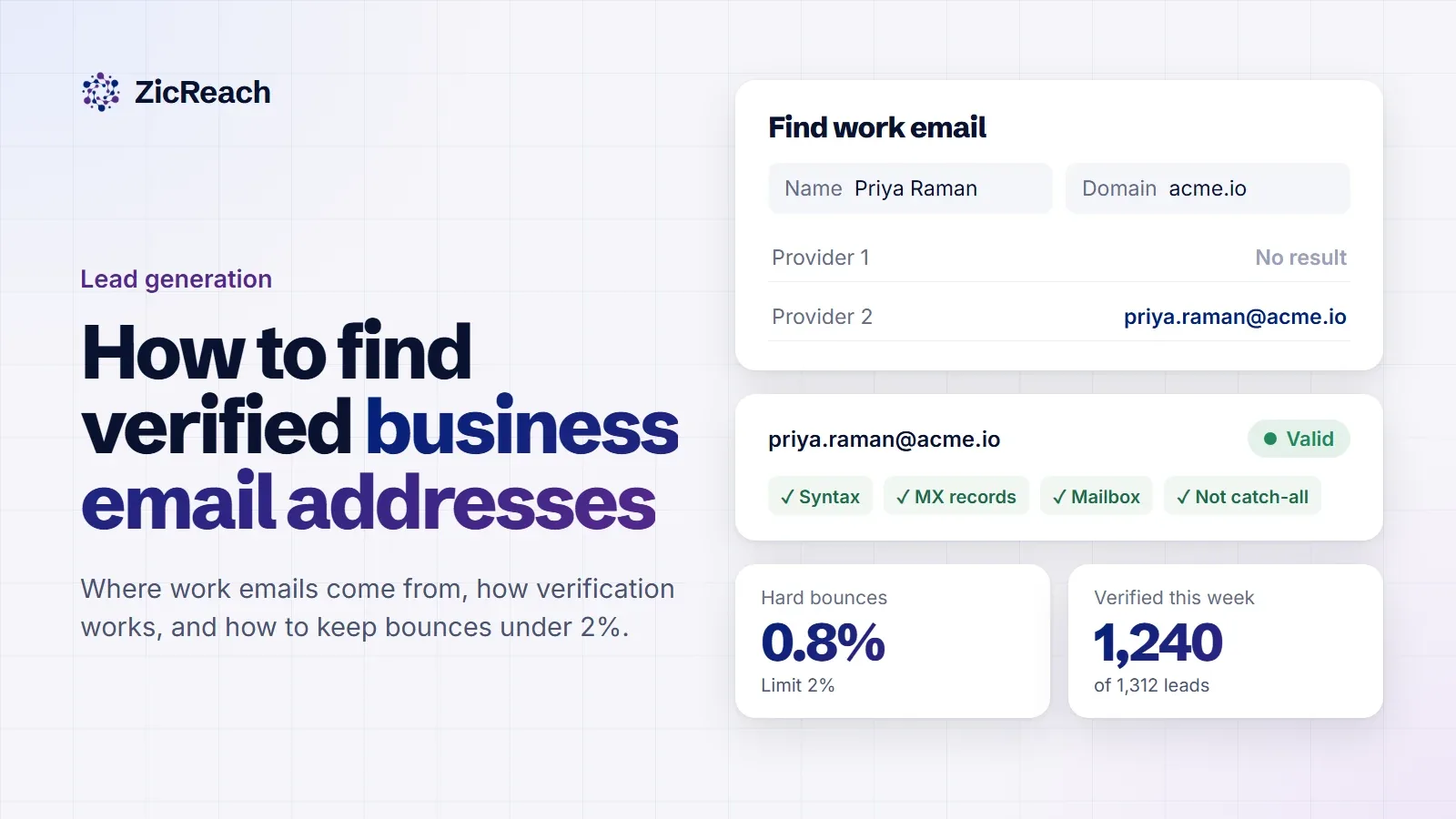
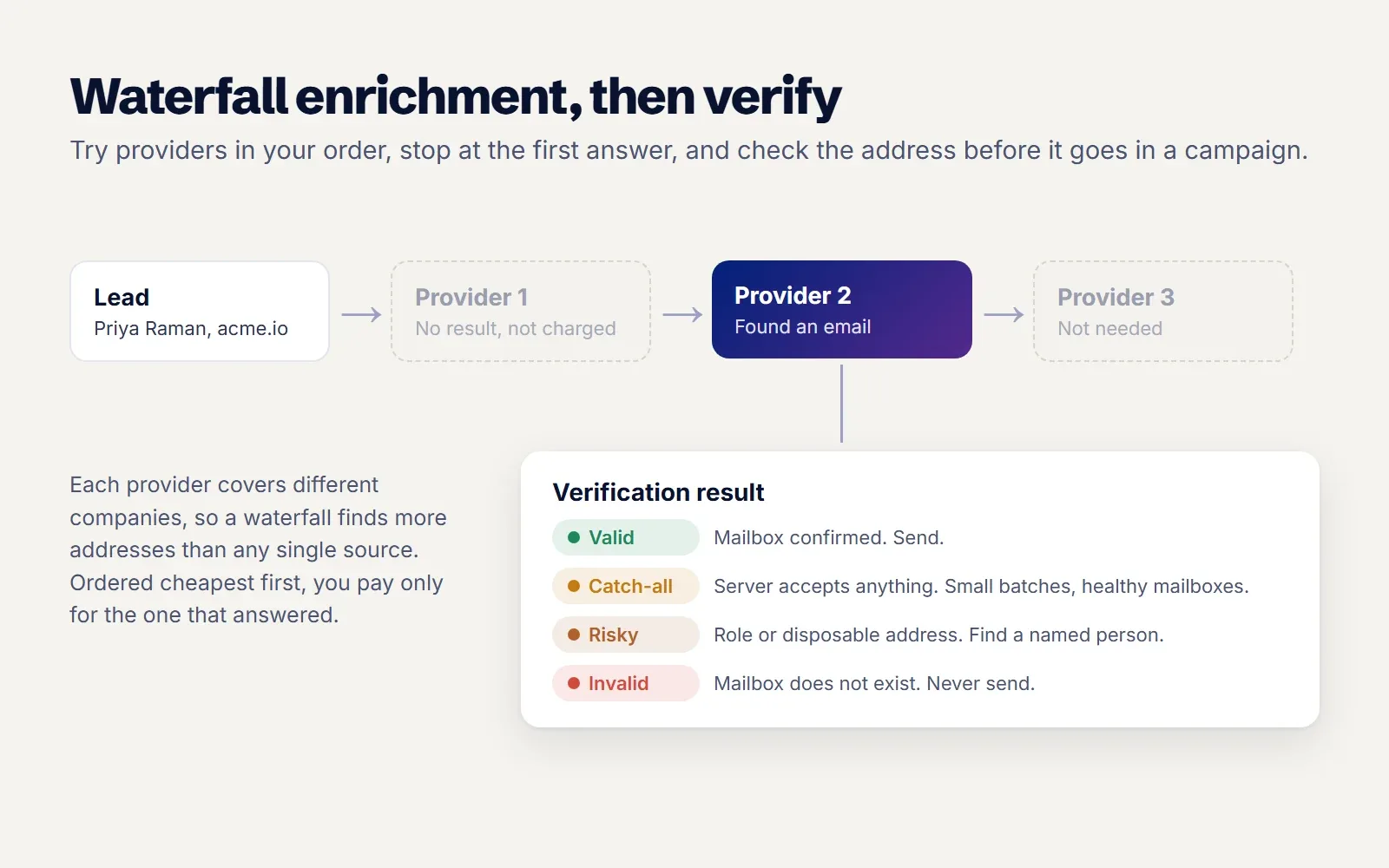
A waterfall tries one data provider, and if it finds nothing, moves to the next, stopping at the first one that returns a result. Because each provider covers different companies, a waterfall finds more addresses than any single source, and if you order it cheapest first, you only pay for the one provider that answered.
| Method | Accuracy | Speed | Cost | Best for |
|---|---|---|---|---|
| Published by the person | High | Slow | Free | A handful of key accounts |
| Professional profiles | Mixed | Slow | Free | Filling single gaps |
| Pattern guessing | Low without verification | Fast | Free | Only with a verifier behind it |
| Single email finder | Medium, varies by market | Fast | Per lookup | Small lists in a market the tool knows well |
| Waterfall of providers | Highest coverage | Fast | Pay for the first answer | Lists of hundreds or thousands |
How email verification works
Whatever method you use, verify before you send. A verifier runs a series of checks without delivering an actual email:
- Syntax. Is it a properly formed address, with no typos such as a missing dot or a doubled @?
- Domain. Does the domain exist, and does it have MX records, meaning it can receive email at all?
- Mailbox. The verifier opens a conversation with the receiving mail server and asks whether it would accept mail for this exact address, then hangs up before sending anything.
- Catch-all. Some servers say yes to every address, real or not. The verifier tests a made up address on the same domain to spot this.
- Risk flags. Role addresses such as info@ or sales@, disposable domains and known spam traps are marked so you can decide what to do with them.
The mailbox check is the important one, and it has limits. Large providers sometimes refuse to answer, rate limit verifiers, or answer yes and then bounce the message later. That is why results come in grades rather than a simple yes or no.
What each verification result means
Here is how to treat each result, using the labels ZicReach shows on every address. Other tools use similar names.
| Result | What it means | What to do |
|---|---|---|
| Valid | The server confirmed this mailbox exists | Send |
| Accepts mail | The domain accepts mail but the mailbox could not be confirmed individually | Send in small batches and watch bounces |
| Catch-all | The server accepts every address, so this one cannot be proven | Send only from healthy mailboxes, in small numbers, after your Valid leads |
| Risky | Role account, disposable domain or another warning sign | Usually skip; find a named person instead |
| Unknown | The server did not answer the check | Re-verify later; do not send yet |
| Invalid | The mailbox does not exist | Never send; find a new address |
Catch-all domains are common at larger companies, and ZeroBounce found more than 9% of the addresses it checked in 2025 were catch-all. Dropping them entirely can cut a list hard. A sensible middle path is to send your Valid addresses first, then add catch-all addresses slowly from mailboxes with a strong history, and stop if bounces climb.
When to verify
Verify as close to the send as you can. An address that was valid when you built the list in March can be gone by June. A simple routine:
- Verify every new lead when it enters a list.
- Verify again right before a campaign starts if the list is more than a few weeks old.
- Mark any address that hard bounces as bounced everywhere, so no other campaign sends to it.
- Set a bounce limit that pauses a campaign automatically. A sudden jump to 5% means the list has a problem, and the right move is to stop and look.
Keeping bounces low protects more than the one campaign. It protects the sending reputation every other campaign depends on. If emails are already landing in spam, our guide on why cold emails go to spam covers the other checks providers run, and new mailboxes should be warmed up for a few weeks before they send to any list, however clean.
Is it legal to find and email business addresses?
It depends on where your recipients are, so check the rules for each market you send to. In the UK, the ICO's guidance on business to business marketing says the PECR consent rule for marketing emails does not apply to corporate subscribers such as limited companies and LLPs. You must still say who you are and give a valid way to opt out. Sole traders and some partnerships are treated like individuals and need consent or the soft opt-in. Because a named work email is still personal data, UK GDPR also applies: you need a lawful basis, usually legitimate interests, and you must tell people how you got their details.
Whatever the jurisdiction, good practice is the same: email people about something relevant to their job, identify yourself clearly, honour every opt out at once and keep a do not contact list that every campaign respects.
Spend lookups on the right people
Every email you find costs time or credits, so decide who deserves one before you start looking. Finding addresses for a list of 5,000 loosely matched names, then sending to all of them, produces more bounces, more ignored emails and a lower reply rate than finding addresses for the 500 people who clearly fit. Score the list first, find emails for the top grades, and come back to the rest when a timing signal appears.
Once the addresses are clean, the next limits on your results are the copy and the follow ups. Our guides on improving your cold email reply rate and getting more B2B sales meetings pick up from there.
A checklist before you send
- Every address came from a named source or a provider you trust.
- Every address was verified within the last few weeks.
- Invalid and Unknown addresses are removed; Risky ones are reviewed.
- Catch-all addresses are in a separate, smaller batch.
- Role addresses are replaced with a named person where possible.
- A bounce limit is set to pause the campaign on its own.
- Opt outs and past bounces are suppressed across every campaign.
How ZicReach handles it
The AI Leads Engine is built around this process. Find People, Find Companies and Find Jobs search our own directory, and a waterfall column fills in work emails and phones from the providers you choose, in the order you set. It stops at the first provider that answers, so you pay for one result rather than four. Every address is verified and labelled Valid, Accepts mail, Catch-all, Risky, Unknown or Invalid, and you can verify, fill in missing data or add rows to a campaign from the same table.
When you send, AI Email Marketing can validate emails before sending, pauses a campaign on its own when bounces pass your limit (5% by default), and marks a bounced address in every campaign so it is never tried again.
Questions people ask
Are email finder tools accurate?
They are accurate enough to be useful and never accurate enough to skip verification. Coverage varies by country and industry, which is why combining providers in a waterfall finds more correct addresses than relying on one.
What is a catch-all email address?
It is an address on a domain whose server accepts mail for any address, real or not. A verifier cannot prove the mailbox exists, so the email might deliver or might bounce later. Send to them in small numbers from healthy mailboxes.
What bounce rate is acceptable for cold email?
Keep hard bounces under 2% of a campaign, and pause any campaign that jumps toward 5%. Higher bounce rates tell mailbox providers the list was not built carefully, which hurts delivery for every email you send.
How often should I verify my email list?
Verify when a lead is added and again right before a campaign if the list is more than a few weeks old. With at least 23% of addresses going bad each year, a list from last year needs a full check.
Can I just guess someone's email format?
You can use the company's pattern as a starting point, but always verify the result. Guessed addresses without verification are the fastest way to raise your bounce rate.
The short version
Finding an email address is the easy part. The work that protects your results is making sure it is current and real: use more than one source, verify right before sending, treat catch-all and unknown results with care, and let a bounce limit stop a bad list before it damages your reputation.
To see how many verified emails you can find for your own market, start ZicReach for free and run one search. The pricing page explains what a verified email costs in credits.
Put this into practice with ZicReach
Find leads, write the sequence and send from warmed inboxes in one place. Free to start, no card needed.
Start for free